

https://mcp.flowmaps.ai/mcp. It’s read-only, and it answers as you: your agent sees the repos your linked GitHub account can read, in the workspaces you choose.
Before you start
- A Flowmaps account with at least one mapped repo. See the Quickstart.
- Your GitHub account linked in Flowmaps (Repos › Add a repo › Connect GitHub). Without it, every tool answers with a reminder to link it, because Flowmaps can’t tell which repos you can read.
- A coding agent that can sign in to the server: Claude Code, VS Code (stable, with Copilot’s agent mode), Zed or Codex. claude.ai connects too.
Add the server and sign in
The MCP page in Flowmaps shows the Claude Code command with a Copy button. Every client uses the same server URL,https://mcp.flowmaps.ai/mcp, and signs in with your Flowmaps account: Google, GitHub or a code by email, the same method you use for the app.
- Claude Code
- VS Code
- Zed
- Codex
Run this once, from any folder. It adds Flowmaps for your user, so it’s available in every project on this machine:To share the server with everyone who works in a repo instead, run it from the repo’s root with
--scope project. Claude Code writes it to the repo’s .mcp.json, which you can commit. Each person still signs in with their own Flowmaps account, so each sees only the repos their own GitHub account can read.Then sign in:- Run
claude, then type/mcp. - Choose flowmaps, then Authenticate. Claude Code opens your browser.
- Sign in with your Flowmaps account. When the browser says you’re done, go back to Claude Code. It keeps you signed in after that.
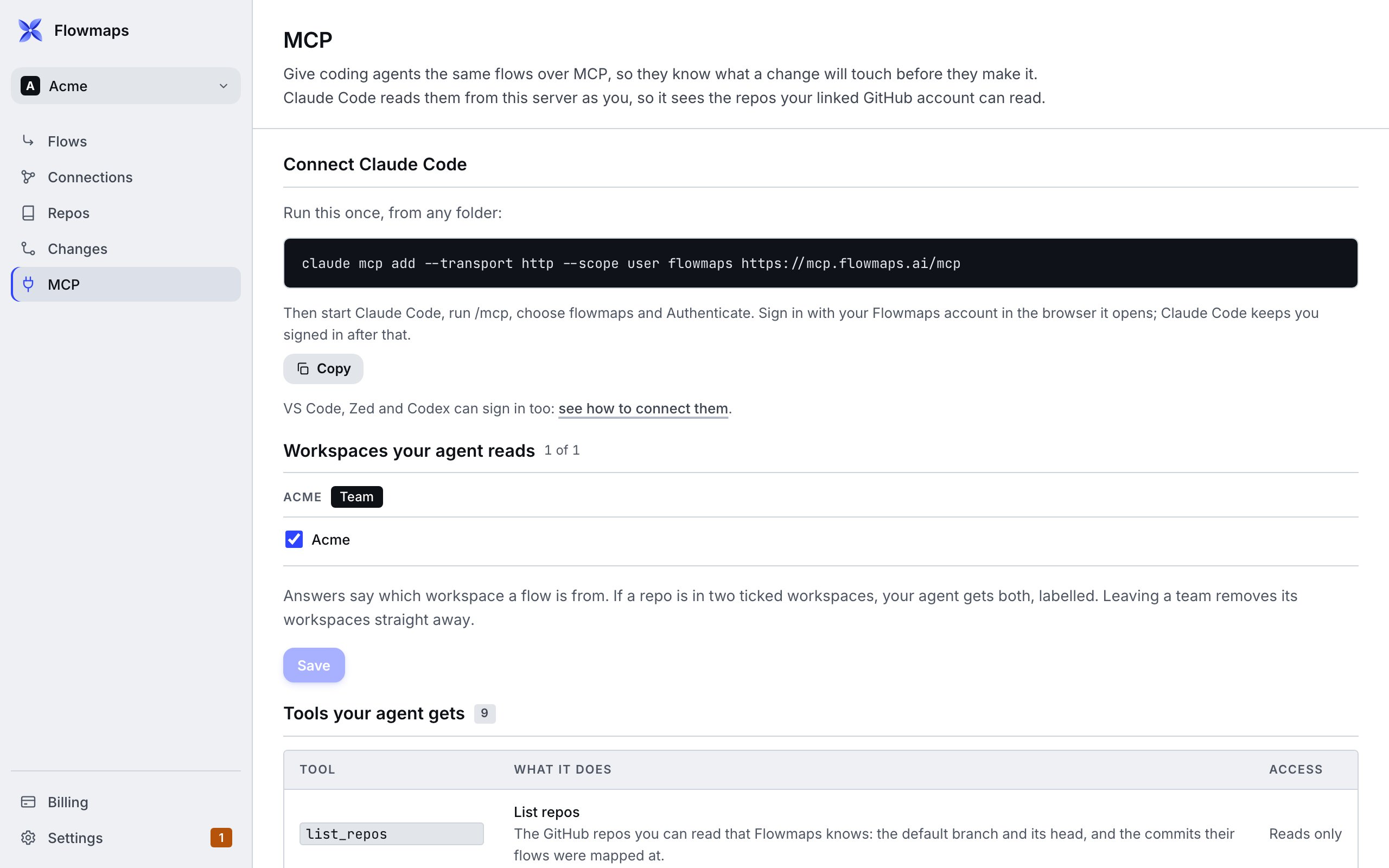
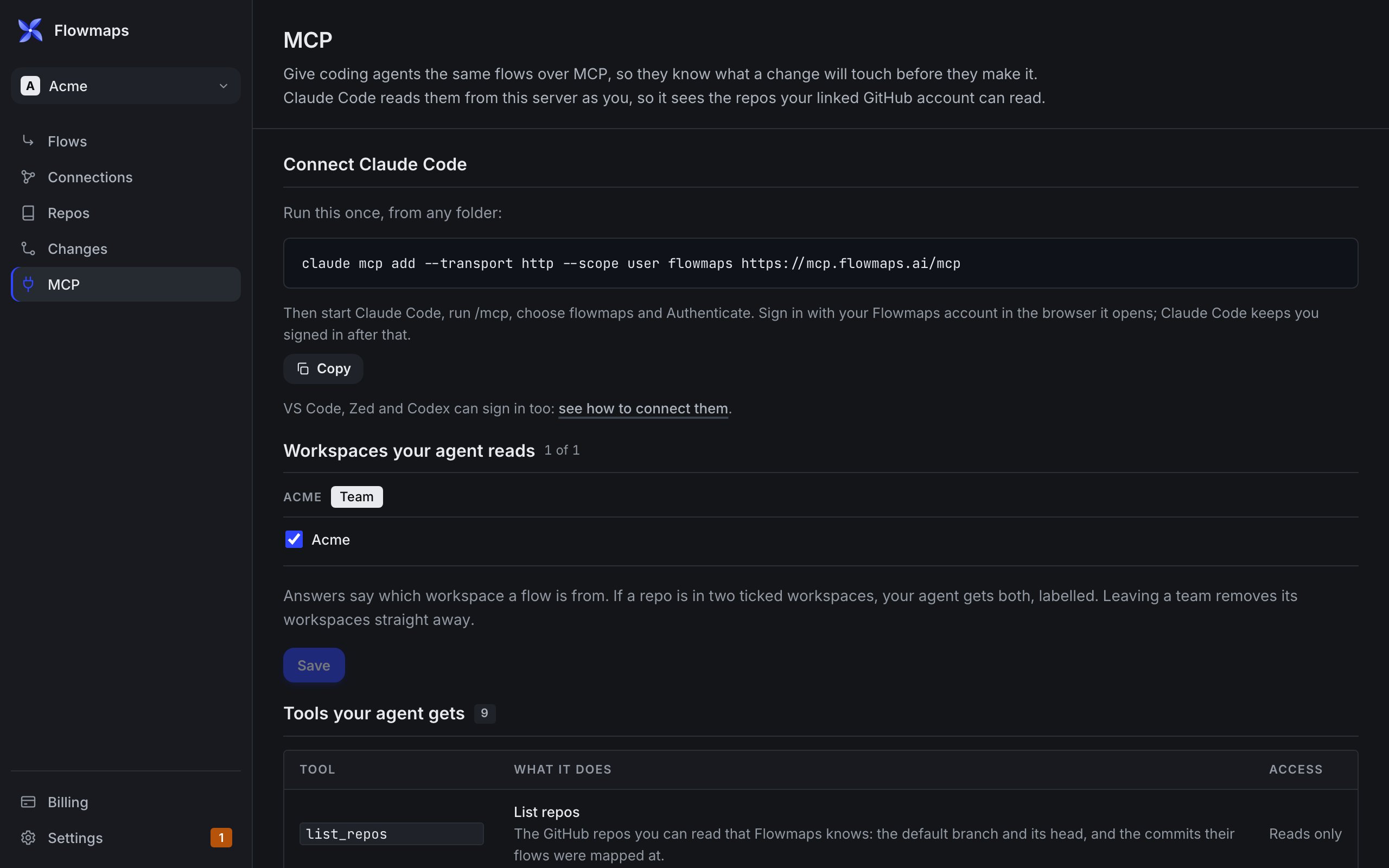
The MCP page: the command to add Flowmaps, the workspaces your agent reads, and its tools.
list_repos and name your mapped repos.
Choose which workspaces your agent reads
Your agent reads the workspaces ticked under Workspaces your agent reads on the MCP page. The list is grouped by account, with team accounts marked Team, and shows how many are ticked.- Tick the workspaces you want your agent to read. At least one must be ticked.
- Choose Save.
Several workspaces and accounts
With more than one workspace ticked, perhaps across several accounts, every answer names theworkspace, account and workspaceId it came from. A repo that’s in two of your ticked workspaces is answered once for each: list answers label each item, and other answers come back under answers. To ask about one workspace only, every tool takes an optional workspace input: its workspaceId, or its name when no other workspace you read has the same one. See MCP tools.
What your agent can do
The hosted server’s tools only read: they find, list and fetch flows, their history, which flows touch a file, external dependencies, pending vendor names and a run’s status. Your agent can’t start maps, change settings or decide vendors; those happen in the app. The MCP page lists the tools with what each does, and MCP tools documents their inputs and answers. There’s a limit on how many tool calls each person can have running at once; a call past it is refused until one finishes.Other MCP clients
The hosted server accepts sign-ins from Claude Code, claude.ai, VS Code (stable; not VS Code Insiders), Zed and Codex. Cursor, Windsurf and VS Code Insiders can’t complete its sign-in yet.Troubleshooting
Every tool says to link my GitHub account
Every tool says to link my GitHub account
Open Flowmaps, go to Repos, choose Add a repo and then Connect GitHub. Once your GitHub account is linked, try the tool again.
A repo I expect is missing
A repo I expect is missing
Check that its workspace is ticked on the MCP page and saved, and that your GitHub account can read the repo.
My agent says the server needs authentication
My agent says the server needs authentication
Sign in again: in Claude Code, run
/mcp, choose flowmaps and Authenticate; in Codex, run codex mcp login flowmaps; in Zed, choose Log Out on flowmaps in the Agent Panel’s settings, then Authenticate; in VS Code, restart the server and accept the sign-in prompt.Next steps
MCP tools
Every tool, its inputs and what it returns.
Recipes
Ways to use Flowmaps from your agent, and a snippet for CLAUDE.md.