

What uses credits
Credits pay for the work of reading code and writing or checking flows:
These never use credits:
- Reading flows, endpoints, history and connections in the app.
- Everything your coding agent reads over MCP.
- Inviting people, adding workspaces and changing settings.
See the cost before you start
When you choose entry points to map, Flowmaps shows an estimate for your selection, such as “About 1,300 credits”, worked out from what a flow in this workspace usually uses on the repo’s models. A pull request that’s waiting for a preview on request shows what a preview there usually uses. Re-mapping a repo on new models shows its estimate before you confirm. A new workspace has no history yet, so its first estimates can be missing. The final amount can be higher or lower than an estimate, and you’re charged for what the work actually used.Model multipliers
On plans where you choose models, each model in the list shows a multiplier: how many credits it uses for the same work compared with Basic models. A model marked 4× uses about four times the credits Basic would for the same map. Multipliers are measured from real work and can change as Flowmaps measures more. See Models.Your balance
Billing shows the account’s balance:- Plan, this period — the plan’s credits for this billing period: granted, used and left.
- Extra credits — credits you bought, or that came with seats added during the period, and when they end.
- Credits left — the total you can spend now.
When credits run out
When the balance reaches zero, new work pauses instead of failing: maps wait, merge updates queue, and previews wait. Nothing you’ve already mapped is lost, and your flows stay readable. Work starts again by itself within a few minutes of credits arriving, whether at the next billing period, from a credit pack or an upgrade: waiting merge updates run, paused maps carry on, and pull requests that weren’t previewed are previewed.A map that runs out of credits partway through keeps the flows it finished and starts nothing new. Once credits arrive, it maps the ones it didn’t reach.
Usage page
Account owners and admins can open Settings › Usage to see where credits went in the current workspace. The tab is for admins only; members can ask an admin.- Time frame — the last 7 or 30 days, a billing period, or days you choose.
- Credits used, Pull requests, Mapping and Busiest day — the totals for the time frame, with the average per pull request.
- Credits by day — a bar per day, split by kind of work or by model. If a monthly limit is set, it shows on the chart.
- By repo and By run kind — mapping, merges and previews, with their share of the total.
- Pull requests — each pull request with its state, how many previews and merges ran, and the credits they used.
- Compute time — how long Flowmaps’ own machines spent on your repos. This is shown for interest and is never charged.
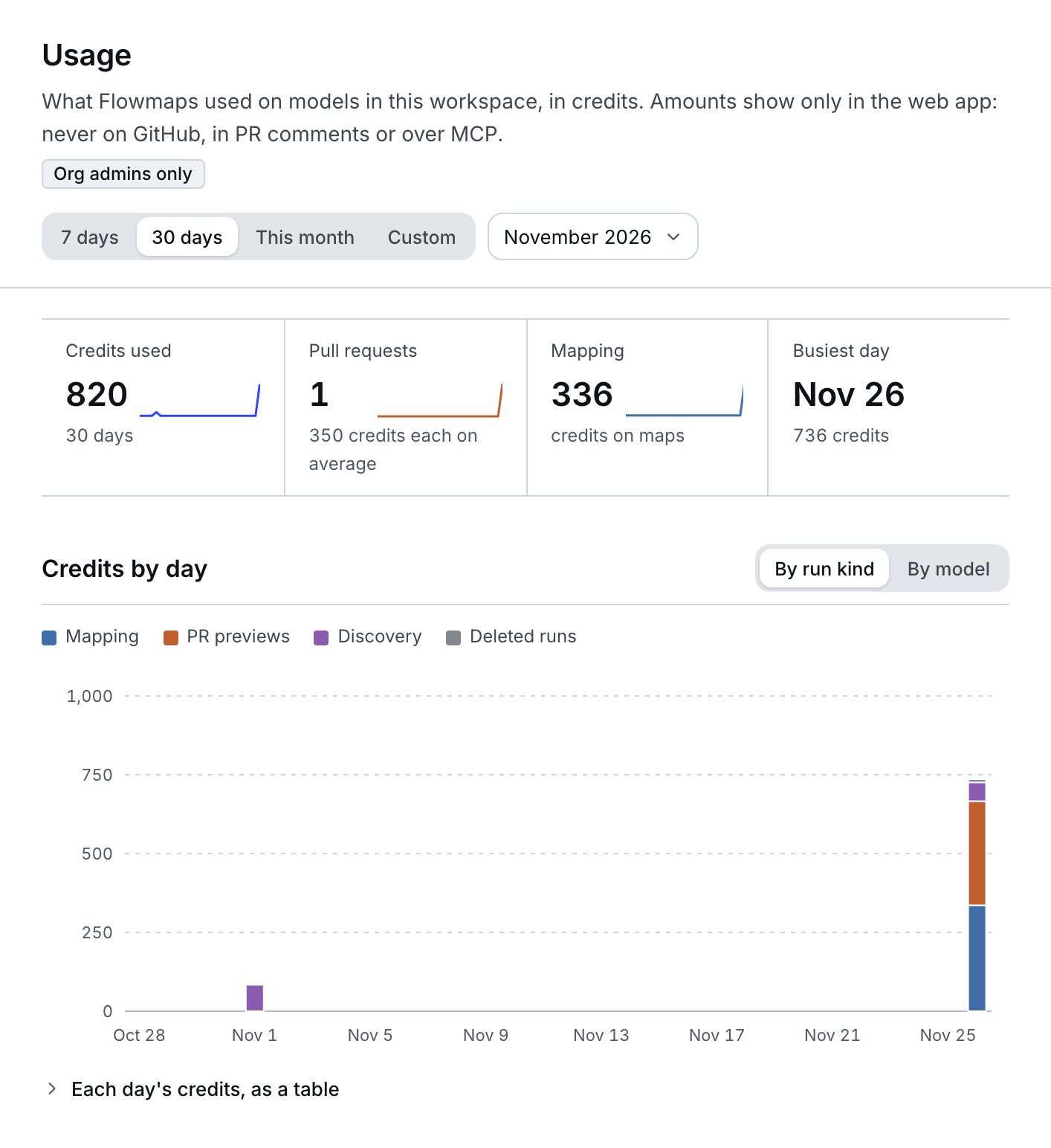
Settings › Usage: totals for the last 30 days and credits by day, split by kind of work.
Set a monthly limit
An owner or admin can cap what the account spends in a billing period:1
Open the limit
Go to Settings › Usage and find Monthly limit.
2
Enter a number of credits
Enter a whole number of credits, like 5,000, and choose Save. Leave it blank (or choose Remove limit) for no limit beyond your plan’s credits.
Buy more credits
On a paid plan, owners and admins can buy extra credits from Billing › Buy credits:- Credits come in packs of , for a pack.
- They last months and are used after the plan’s credits run out.
- Work that paused for credits starts again once they arrive.
- You pay on Stripe’s checkout page, where tax is added if it applies.
Automatic top-up
Automatic top-up buys credits with your card on file when the balance runs low, so work keeps going instead of pausing. It’s off until you turn it on in Billing › Automatic top-up:- When the balance falls to — the balance, in credits, that starts a top-up.
- Buy — how many packs each top-up buys.
- At most each month — the most top-up can buy in a month. You have to set this to turn top-up on.
Team credits
On Team, each seat adds credits a month to one pool that everyone in the team shares. When someone joins mid-period and adds a seat, the team gets a share of that seat’s credits for the rest of the period. See Teams and members.Next steps
Plans
Credits and limits on each plan.
Models
Choose models and see their multipliers.